

The short answer
You cannot apply for or guarantee a Google Knowledge Panel. What you can do is make it easier for Google to understand who you are. Keep your key facts consistent, use one strong official website, connect your genuine profiles, and support your story with trustworthy independent sources.
Check your presence for freeHow Knowledge Panels work for CEOs and executives
Google builds these summaries from information it finds across the web. The job becomes harder when people share a name, use different job titles, or have profiles that tell slightly different stories.
No agency, website or database controls the final result. Clear, accurate evidence simply gives Google a better chance of connecting the right person with the right work. If a panel appears, you may then be able to claim it and suggest corrections.
More pages will not help if your main sources disagree. Correct your strongest source first, then bring the rest into line.
The practical process
Seven steps to strengthen a CEO or executive entity
Define the canonical identity
Define one preferred public name and document the preferred name, current title, former roles, company relationships, board appointments and location.
Establish an authoritative home
Maintain an authoritative executive biography or personal site with dated roles and official company links.
Align specialist records
Review company leadership pages, corporate announcements, professional profiles, event biographies and accurate Person-to-Organization relationships, correcting duplicates and outdated records at their source.
Publish accurate structured data
Publish Person structured data only where it matches visible, verifiable page content.
Build independent corroboration
Prioritise substantive business reporting, appointment coverage, conference biographies and independently verified leadership records.
Connect entity relationships
Describe relationships to organisations, works and events explicitly instead of merging separate entities.
Monitor, claim, and correct
Monitor meaningful changes, preserve evidence URLs and use Google's official verification or feedback routes when available.
1. Create a canonical fact register
Begin with a source-backed record of preferred name, current title, former roles, company relationships, board appointments and location. For every fact, record the preferred wording, a reliable source URL, who owns the correction, and the last review date. This prevents a website update from creating new conflicts elsewhere.
Search the public name with role, location, organisation, and important-work qualifiers. Note same-name entities, outdated biographies, duplicate profiles, incorrect images, and mismatched dates. Resolve ambiguity with evidence rather than keyword repetition.
2. Build the official identity hub
The strongest owned foundation is an authoritative executive biography or personal site with dated roles and official company links. The page should identify the subject immediately, use a stable canonical URL, and link only to profiles and organisations that genuinely belong to the entity.
- Put essential facts in crawlable HTML.
- Use descriptive page titles, headings, links, and image alternatives.
- Maintain a visible updated date for facts that change.
- Redirect retired canonical pages rather than abandoning their authority.
- Keep biography and contact information accessible on mobile.
3. Align the records specific to CEOs and executives
Generic social profiles are only one layer. Review company leadership pages, corporate announcements, professional profiles, event biographies and accurate Person-to-Organization relationships. Correct duplicate, merged, or misattributed records through each platform’s supported process.
Do not create accounts or database entries merely to fill a checklist. A record is useful when it is legitimate, maintained, relevant to the profession, and capable of supporting a fact without contradicting stronger sources.
4. Add structured data that matches visible content
Use the most accurate Schema.org type for the page and subject. For this guide, Person is the usual starting point, but more specific types and relationships may apply. Google recommends using accurate author or organisation types and valid URLs that uniquely identify the entity.
{
  "@context": "https://schema.org",
  "@type": "Person",
  "name": "Preferred public name",
  "url": "https://official.example/",
  "description": "Accurate visible description",
  "sameAs": ["https://relevant-platform.example/profile"]
}
Only include facts and links that visitors can verify. Validate the rendered page and remember that valid markup does not guarantee a Knowledge Panel or rich result.
5. Build independent corroboration
Owned pages describe the subject’s position. Independent sources test whether other credible organisations recognise it. Relevant evidence for this niche includes substantive business reporting, appointment coverage, conference biographies and independently verified leadership records.
Evaluate every source for editorial independence, specificity, factual depth, permanence, and relevance. Ten copied announcements do not provide the same corroboration as one detailed, independently reported profile.
6. Connect relationships without merging entities
Map the subject to works, employers, companies, publications, collaborators, events, and official profiles. Each connected object may be its own entity. Describe the relationship explicitly and use stable URLs so machines do not have to infer whether two names refer to the same thing.
Review the CEO or executive service page for the signal categories used in our public-source assessment.
7. Monitor, claim, and correct
Keep a dated snapshot of relevant searches and the sources supporting important facts. Recheck after substantive website, profile, publication, or role changes—not simply every day. When an eligible panel can be claimed, use Google’s verification process. Submit corrections with a concise explanation and reliable evidence URLs.
A simple way to plan the work
The four-layer evidence stack
Think of your online identity in four connected layers. This is a planning tool, not a Google score or a promise of a result.
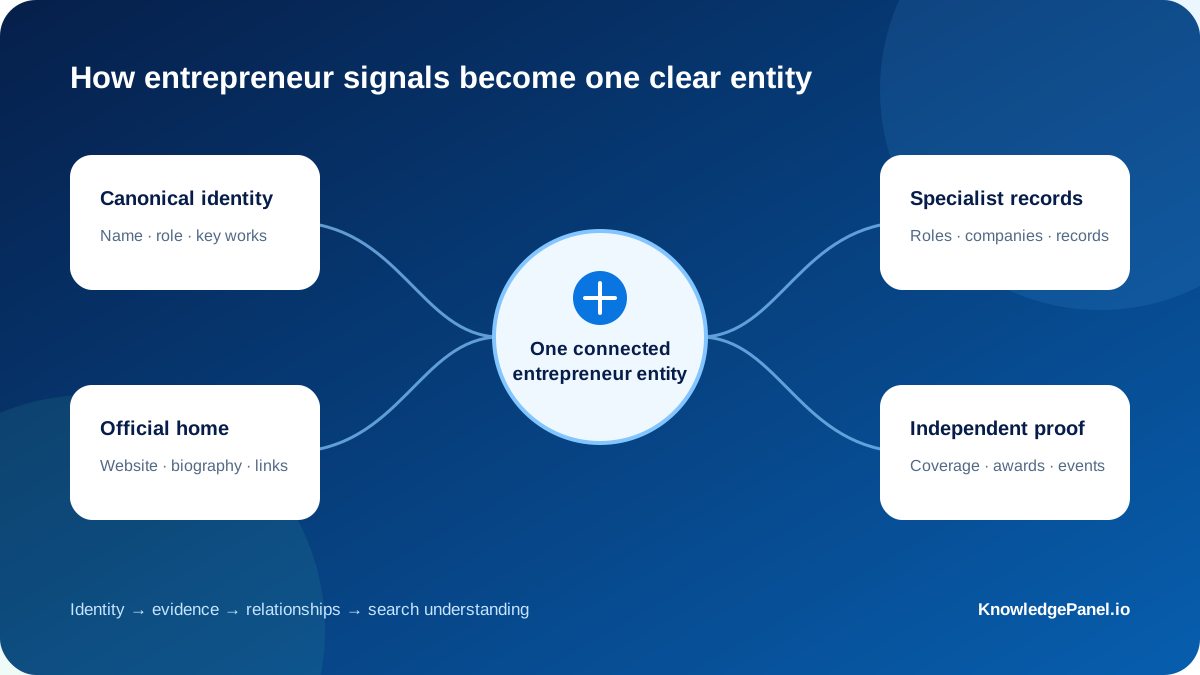
Identitypreferred name, current title, former roles, company relationships, board appointments and location
Your official homean authoritative executive biography or personal site with dated roles and official company links
Relevant profilescompany leadership pages, corporate announcements, professional profiles, event biographies and accurate Person-to-Organization relationships
Independent supportsubstantive business reporting, appointment coverage, conference biographies and independently verified leadership records
A 20-point evidence inventory
Score each category from 0 to 4 using evidence available today. The total is an internal completeness measure, not Google’s score.
A practical 30/60/90-day plan
Audit and correct
Build the fact register, identify same-name conflicts, repair the official hub, and prioritise factual corrections at authoritative sources.
Connect the evidence
Align specialist records, implement valid markup, consolidate profile links, and document entity-to-work or entity-to-organisation relationships.
Strengthen and monitor
Develop legitimate independent evidence, review search presentation, preserve snapshots, and use official verification or feedback tools where available.
This is an operational sequence, not a promise that Google will create or update a panel within 90 days.
Common mistakes to avoid
- Using different names or biographies across authoritative profiles.
- Treating an organisation, programme or work as the same entity as the person.
- Relying only on self-published or promotional sources.
- Adding structured data that is not supported by visible content.
- Leaving duplicate or outdated specialist profiles unresolved.
- Presenting a readiness assessment as a guarantee of a search feature.
Frequently asked questions
Can a CEO or executive create a Knowledge Panel directly?
No. Google generates knowledge panels automatically from information found across the open web. If a panel is available to claim, the subject or an authorised representative can follow Google’s verification process.
Does structured data guarantee a panel?
No. Accurate structured data can clarify what a page describes, but Google does not guarantee any search feature even when markup is valid.
How long does the process take?
Google publishes no fixed timeline. Crawling, identity ambiguity, source quality, public prominence, and changes across the web can all affect discovery and presentation.
Which sources matter most for CEOs and executives?
Start with official professional or institutional records, then add accurate specialist profiles and genuinely independent sources that clearly identify the same CEO or executive.
Can KnowledgePanel.io guarantee a panel?
No. The assessment identifies evidence gaps and practical corrections, but Google alone determines whether and how a Knowledge Panel appears.
Sources and further reading
Your next step