
Your Instagram, LinkedIn or YouTube account is active, but Google’s Knowledge Panel does not show it. You may have claimed the panel already, added links to your website or watched another account appear while yours remains absent. The useful question is whether the profile is clearly connected to the entity—and which correction or feedback route is available for that specific result.
What to do first
Confirm that the panel and social account represent the same entity. Audit the public profile URL, biography and official website links, correct contradictions and review accurate sameAs markup where appropriate. If you represent the panel, use Google’s available feedback options to suggest the genuine profile. A real account or a schema entry does not guarantee that an icon will appear.
1. Work out what is actually missing
There are three different situations to distinguish. A profile can be missing from the panel, missing from an assessment’s verified evidence or genuinely unavailable to public visitors. Only the first describes what Google displays. A report that has not assessed social profiles cannot settle the other two.
Search for the relevant entity and record the panel you see. Open the social account’s public URL and check its visible identity. If the account is private, renamed or accessible only while logged in, document that limitation rather than treating your owner view as the public version.
Do not confuse a person’s account with their company page. A founder may maintain both, while an artist may operate a personal account and a band account. A Knowledge Panel representing one identity should not be filled with accounts belonging to related but different subjects.
2. Why claiming a panel does not settle every profile link
People ask whether submitting proof of several accounts should make all their social icons appear. An older Reddit discussion describes exactly that frustration. It is useful evidence of the question readers need answered, but its comments should not be treated as current instructions from Google.
Google’s current guidance allows suggestions to add or edit social profiles through the supported feedback process and says their order cannot be changed. The available interface and your representative status matter. Inspect the controls shown for the panel you manage instead of following an outdated screenshot from somebody else’s account.
Claiming establishes a representative relationship; it does not make every desired public link automatically correct. Prepare evidence for the specific account. A request to connect a genuine artist account should explain that identity connection, not rely solely on the fact that the requester can sign into a social service.
Reader question: claimed panel missing social icons · Google: feedback and social profile suggestions
3. Build a small, accurate profile inventory
List the actual public URLs rather than a list of platform names. On each page, check the display name, current handle, biography, entity type and website destination. Note aliases and former handles where they are genuinely relevant. A consistent identity does not require identical marketing copy, but substantive facts should not contradict one another.
Prefer a direct profile URL over a search page, login URL, temporary sharing link or a post that merely mentions the subject. Click through from your official website and confirm that the link reaches the intended account. Handles can change, so test the destination instead of trusting an old link label.
Check the reverse connection where the platform allows one. Does the profile link to the right official website? Does it identify the same person, business or project? A matching name and logo alone may not resolve ownership when namesakes or unofficial fan pages exist.
Keep a row for uncertain accounts instead of silently treating them as official. If an account is abandoned, impersonating the subject or owned by a separate organisation, investigate it through the relevant platform’s process. Do not add a questionable URL to structured data just to increase the number of links.
- Direct public profile URL and current handle
- Person, organisation or project represented
- Visible name, role and biography
- Website destination and working reciprocal links
- Any ownership uncertainty or legitimate alias
4. Interpret the social status in your assessment correctly
Open Identity & sources in KnowledgePanel.io and read the Social profiles row. In the captured example it says Not assessed. That is a measurement limitation in the saved record, not a finding that the person lacks social media accounts or that Google cannot discover them.
Next inspect identity alignment for relevant names, roles and website connections. A profile audit can reveal that an official website points to an outdated account while the report’s website relationship still needs verification. Those are specific tasks to investigate rather than one broad instruction to improve social presence.
The example shows three of five identity facts aligned. It does not grade every social account or imply that adding two profiles would make the result five of five. Each check has its own evidence and reason. Read those details before turning a number into a prescription.
The screenshot is an existing Dan Lok example record captured on 7 October 2026, used to explain the interface. It does not imply endorsement or a customer relationship. The platform helps organise the investigation; where social evidence is unmeasured, manual profile verification remains necessary.
Correct a wrong Knowledge Panel website
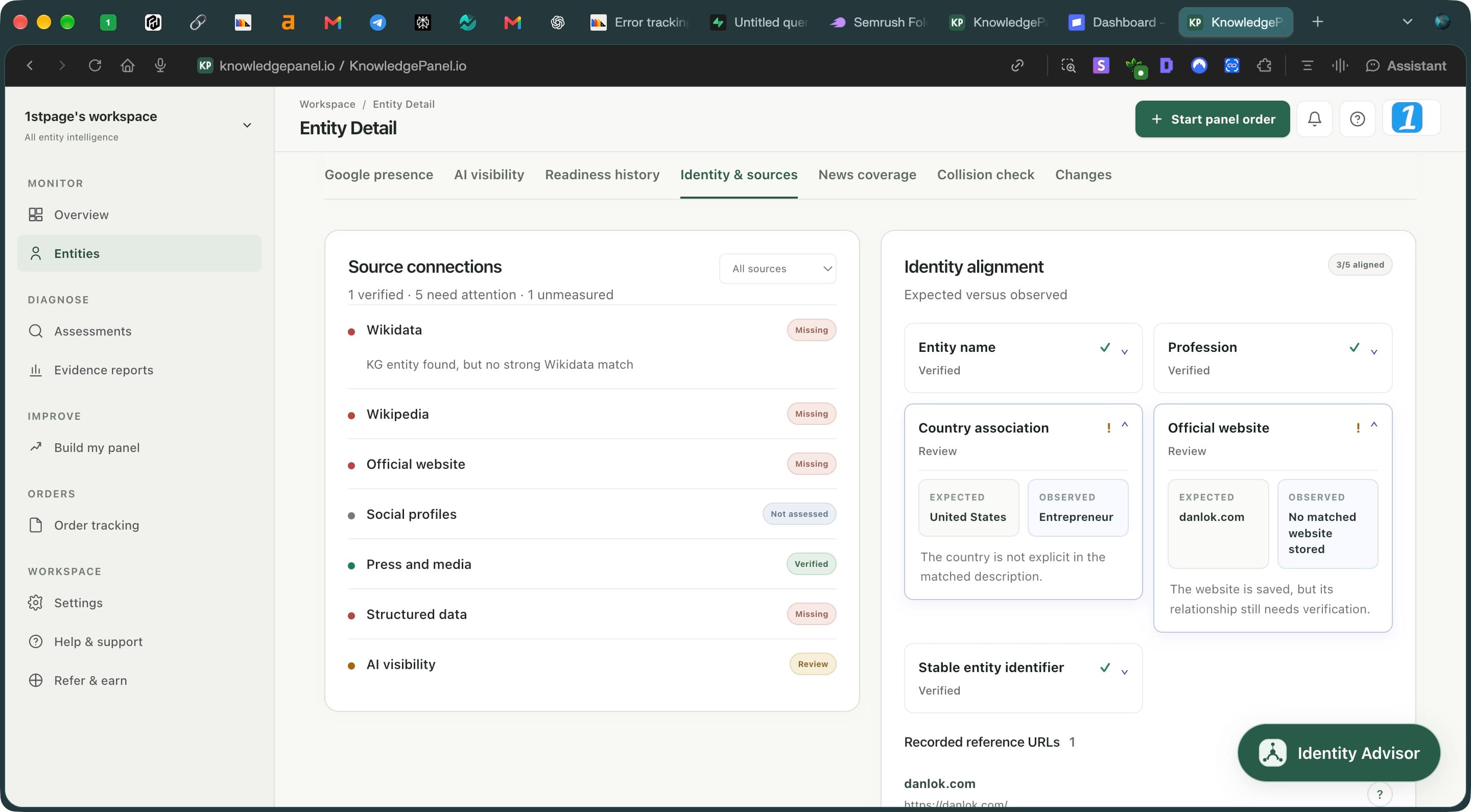
- Read the channel status. Not assessed means unmeasured, not absent.
- Expand a review item to compare expected details with observed evidence.
- Read the explanation before changing a fact or website connection.
5. Use sameAs for genuine identity links
Schema.org defines sameAs as a URL that unambiguously identifies the same item. For this audit, the important test is whether the destination represents the same subject as the page’s entity. An employer, collaborator, publication or customer is not interchangeable with that subject.
Ask your developer to review markup already on the page before adding another block. Keep a stable identifier for the entity and include only genuine relevant profiles. The following fictional illustration shows the relationship; it is not a complete template for every Google search feature or a claim about the accounts used in our screenshots.
Make the profile links visible to people as well. Structured data should reinforce accurate page content, not hide an affiliation claim that the page cannot support. If your site represents a company, use the appropriate organisation identity rather than changing it to a person because you want the founder’s social account displayed.
{"@context":"https://schema.org","@type":"Person","@id":"https://example.com/about#person","name":"Example Professional","url":"https://example.com/","sameAs":["https://www.linkedin.com/in/example-professional/"]}6. Suggest the profile with public supporting evidence
If the panel belongs to you or an entity you officially represent, check the available verification and editing route. Use the associated account and follow Google’s current instructions. General feedback is a different route from verified representative feedback, so keep your status clear.
For the account you want added, provide its direct public URL and references that establish the identity relationship. Describe the requested change precisely. If the panel points to an incorrect account, identify the incorrect URL separately and explain the mismatch rather than only requesting an additional icon.
Keep a copy of your request and any response. Where a suggestion cannot be verified, strengthen the actual public connection instead of submitting more accounts indiscriminately. Neither a paid service nor a profile inventory gives you control over the final arrangement of Google’s result.
7. Measure the result you actually wanted
After correcting links or receiving a response, check the live panel and the account destination. Save what is displayed and when. Keep this observation separate from a historical product status: a saved report can remain unmeasured even when you can see a profile icon on Google.
Also assess the visitor experience. Someone reaching the profile should recognise the right entity and find the current website. That is a useful improvement even if a panel icon has not appeared. Use platform analytics for engagement rather than expecting identity alignment to measure follower growth.
Recheck your entity when public evidence has materially changed and your allowance permits it. Record which corrections were completed and which questions remain open. Avoid reporting a social-media success solely because a headline readiness score moved; verify the relevant profile connection itself.
Fix identity gaps in your online presence · Understand AI mentions and website citations
Frequently asked questions
Does sameAs guarantee social icons in my Knowledge Panel?
No. It describes same-entity relationships on your website. Google decides the search display. Use accurate visible links and supported feedback rather than treating markup as an instruction to add icons.
Does Not assessed mean my accounts are missing?
No. It means that channel was not measured in the saved assessment. Verify the actual public profiles and inspect the live panel separately.
Can I choose the order of social profiles?
Google’s current Knowledge Panel feedback guidance says profile order cannot be changed. Focus on accurate account identity and correcting wrong links. Read the supporting guidance.
Should I create an account on every network?
Create or maintain accounts that genuinely serve the entity and its audience. Extra empty profiles do not resolve ownership ambiguity or contradictory biographies. An accurate small inventory is easier to maintain.
Can I add my company’s profile to my personal panel?
Do not treat a company account as identical to the founder. Explain the relationship accurately and follow the options appropriate to the represented entity; owning both accounts does not make them the same identity.
Find the evidence behind your next correction
Review your entity’s public signals, inspect what needs attention and keep a baseline for your next assessment.
Review your entity →