
Your Knowledge Panel appears when someone searches for you, but its website link sends visitors somewhere else. Perhaps it points to an old domain, a company you no longer represent or a different person with your name. The visible symptom is one incorrect link. The useful investigation asks which identity the panel represents and what public evidence connects that identity to the correct website.
What to do first
Save the search query, panel and incorrect destination. Verify that the panel represents the right entity, gather public pages supporting the correct website and fix contradictory links you control. Then use the panel’s available Google feedback or verified editing options to request the specific correction. Our platform can help inspect the evidence; it cannot approve the change for Google.
1. Confirm which Google result you are trying to change
Identify the actual surface before following a tutorial. Is it a Knowledge Panel about a person or organisation, a local Business Profile, or an ordinary search result linking to a website? Similar-looking results can have different management routes. A business opening-hours error should not automatically send you into a personal Knowledge Panel claiming process.
Google describes Knowledge Panels and Business Profiles as distinct products. If the result represents a business serving customers at a location or service area, check whether the correction belongs in Business Profile management. If it is an entity panel, gather evidence for that entity.
Save the exact query and the visible panel, including the destination URL. Search displays can vary; a record of what you saw is more useful than a general statement that Google has the wrong information. Keep the date and whether the observation was made while signed in, without treating a single search as a universal view.
2. Distinguish an outdated domain from the wrong entity
Open the destination carefully and compare the page with the entity in the panel. Check the displayed name, role, organisation and work. An old official domain is a migration problem. A domain belonging to a namesake is an identity problem. A correctly related company website may still be an unsuitable destination for a panel representing the individual.
Build a short evidence table containing the panel’s current URL, the proposed official URL and a public source connecting that URL to the entity. Record any former names or domains honestly. If an old domain remains under your control, ask your developer to review an appropriate redirect and update prominent links.
Do not assume that buying a domain with your name proves official ownership of an existing public identity. The page should actually identify the subject, and other relevant public records should support the relationship. The goal is a correction backed by evidence, not a contest over which address looks more convenient.
A musician on Reddit described a panel linking to the wrong website and uncertainty about how to change it. That older discussion illustrates the user problem; it is not the current authority for Google’s editing rules. Use current official instructions when submitting the request.
3. Inspect the website relationship in your entity report
Open the relevant entity in KnowledgePanel.io and review Google presence together with Identity & sources. Confirm the recorded match and read the official website alignment reason. A saved domain and a verified identity-to-domain connection are separate things.
The captured example contains danlok.com as an expected website but shows no matched website stored in that alignment observation. The explanation says the relationship still needs verification. This supports a narrow statement: that saved check did not verify the connection. It does not establish that the website is absent or that Google is linking to the wrong domain.
The same example has 3/5 identity facts aligned. Use the individual checks rather than interpreting the number as a probability that the website is correct. Expand the review item and identify what evidence is missing.
These screenshots show an existing Dan Lok example record captured on 7 October 2026. They illustrate report interpretation without implying endorsement, a customer relationship or a complete assessment. If an older report lacks a live search or panel observation, inspect Google directly before alleging a current panel error.
An artist-specific identity evidence checklist
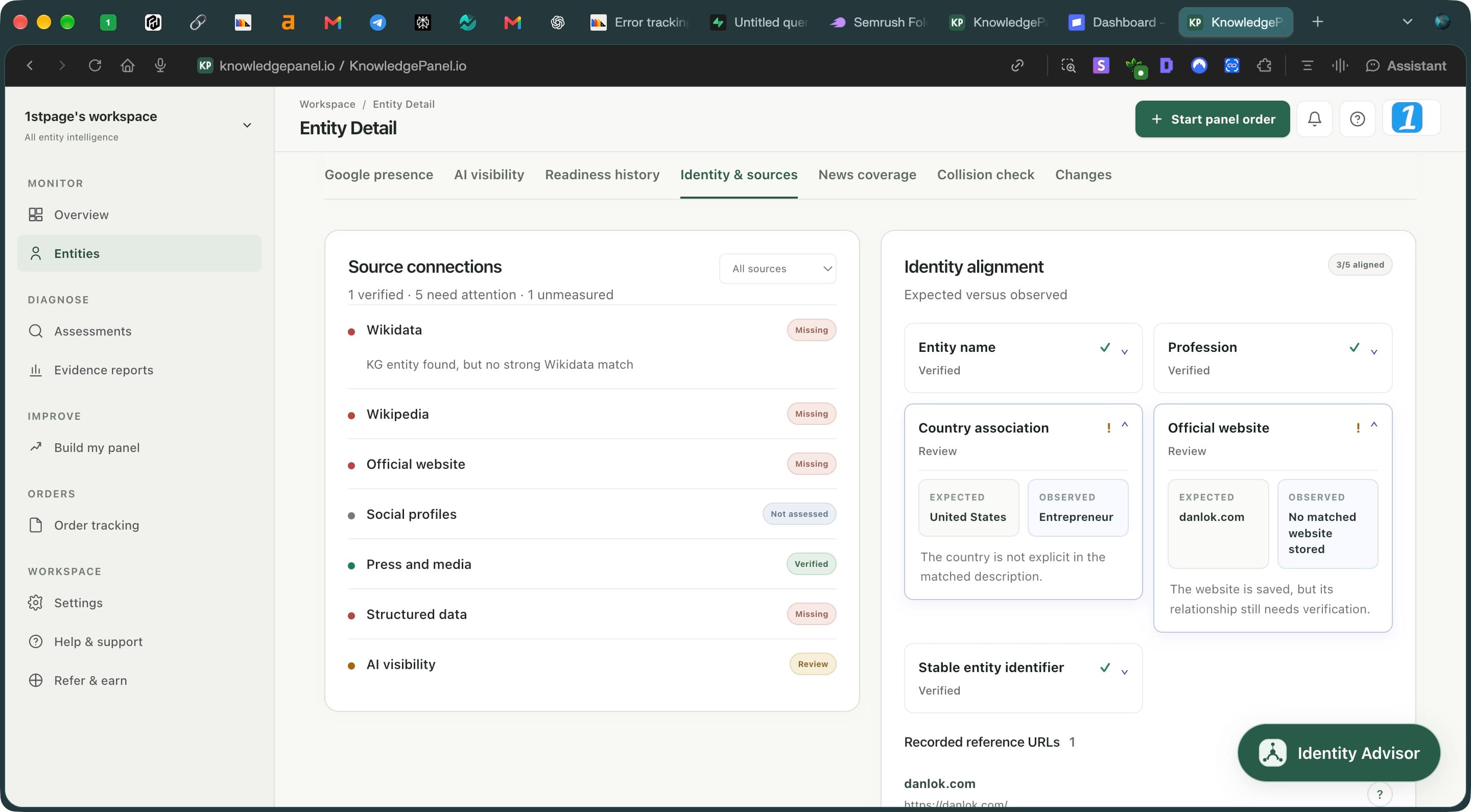
- Read the channel status. Not assessed means unmeasured, not absent.
- Expand a review item to compare expected details with observed evidence.
- Read the explanation before changing a fact or website connection.
4. Prepare evidence that supports one clear correction
Make the correct destination easy to verify. The official page should identify the entity immediately and explain relevant work or organisational relationships. Check that the URL is publicly accessible and leads to the intended page, rather than a login screen, parking page or unrelated campaign.
Collect a small set of relevant public references. A genuine professional profile linking to the website, an accurate publisher biography or an organisation’s maintained team page may help establish the relationship. Explain why each source matters. Ten copies of an unsupported claim are less useful than a few clear references with identifiable ownership and context.
If you changed domains, document the transition. Correct links on your owned profiles and other pages you maintain. For external sites, request a precise URL correction from the publisher. Keep previous and current addresses in your change log so the history does not become another unexplained discrepancy.
- Panel query and dated screenshot
- Current incorrect URL and proposed correct URL
- Public page identifying the intended entity
- Relevant supporting profiles or professional records
- Brief explanation of any domain or role change
5. Request the change through Google’s available options
For an existing claimable panel that you represent, follow Google’s verification process with the correct associated account. Not every panel is claimable. A verified representative may have editing options that a general search user does not have; inspect the interface actually available to you.
Google’s current feedback guidance asks for a specific description of the problem and publicly accessible URLs supporting the suggestion. Submit distinct issues separately. If you are not a verified representative, use the available general feedback route rather than pretending to control the entity.
Keep the submission factual. A concise request identifies the wrong destination, gives the correct destination and explains the public evidence connecting it to the panel’s subject. Do not request unsupported affiliations or combine a website correction with a promotional biography rewrite.
Save the submission date and any response. Google reviews the request and decides whether to accept it. Do not promise a fixed outcome or keep submitting conflicting versions of the same change because a scan has not yet moved.
Google: verification for entity representatives · Google: submit supported feedback
6. Align visible links and technical identity information
Review your own website and profiles while the request is pending. Correct the visible official URL, update legitimate social links and remove references to unrelated identities. Ask your developer to check canonical URLs, redirects and entity identifiers when a migration is involved. The dashboard’s website flag alone does not diagnose every technical migration issue.
Accurate structured data can describe the entity and associated URLs. Use sameAs only for pages that unambiguously identify the same subject; a founder and their employer are related but different entities. Keep markup consistent with the public page rather than inserting facts that visitors cannot verify.
This cleanup is worthwhile independently of the panel request. People clicking your profiles should reach the right destination now. It does not give you control over Google’s panel link, and adding markup is not a guaranteed panel correction mechanism.
7. Verify the actual destination after a change
When you receive a response or observe an update, revisit the original query and click the displayed website link. Confirm the final destination after redirects. A changed label is not sufficient if visitors still land on the wrong page.
Record the visible result separately from your product assessment. A verified website connection in a saved report does not automatically prove that a live panel now displays that URL. Conversely, a panel may show the correct website while a historical assessment still needs updating.
Run a new assessment when there is a substantive reason and your access permits it. Preserve the earlier record and compare relevant evidence. If the request is declined, inspect the stated reason and strengthen a genuine missing connection; repeating the same unsupported request is not a substitute for better evidence.
Fix identity gaps in your online presence · Understand AI mentions and website citations
Frequently asked questions
Can KnowledgePanel.io change the website in my Google panel?
No. It can help you inspect identity and website evidence. Google controls the displayed panel and its correction process. Submit the supported request through the available Google options.
Why is my website saved but still marked Review?
Saving the URL records your expected website. The assessment must separately support its connection to the matched identity. Read the explanation before assuming there is an error on Google.
Do I need to claim a panel before reporting a wrong website?
Google provides general feedback, while verified representatives may have additional editing options. Check the current process and available controls for your panel; not all panels are claimable.
Will sameAs fix the website link automatically?
No. It describes an identity relationship on your page. It is not a command to change Google’s panel or a guarantee that a particular link will appear.
How long will a correction take?
There is no outcome or timing we can guarantee. Keep the submission evidence and follow any response from Google. Verify the actual live link rather than relying only on a score change.
Find the evidence behind your next correction
Review your entity’s public signals, inspect what needs attention and keep a baseline for your next assessment.
Review your entity →