
Your name may appear across websites, social networks and search results without those pages telling one clear story. A biography describes an old role. A social account links to a former domain. An AI answer recognises your name but cites somebody else’s website. These are the kinds of identity gaps worth investigating before you invest in more content or promotion.
What to do first
Start with the fact that could mislead someone most: the wrong website, an outdated role or an account that belongs to somebody else. Verify the correct information, repair the public source you control, and then align the other relevant pages. Use an assessment to inspect the evidence and track what changed; repeating a claim across more profiles does not verify it.
What is an identity gap?
In this guide, an identity gap means a missing, inconsistent or insufficiently verified connection between an entity and its public evidence. The entity might be a person, company or creative project. The gap concerns whether someone can confidently connect the right name, role, website, profiles and work. This is a practical audit definition, rather than a formal Google metric.
Consider an author whose website uses a pen name while LinkedIn uses a legal name. Both may be accurate. The problem is an unexplained relationship between them. A useful correction documents that relationship openly, where appropriate, instead of forcing every page to use identical wording. Consistency should preserve the truth, including legitimate aliases, changing roles and separate businesses.
Social presence is one part of this picture. Posting regularly helps people encounter you, but an identity audit asks a different question: do those profiles clearly belong to the same person or organisation? A large audience cannot resolve an ambiguous website connection by itself. Start with accuracy and ownership, then consider reach and engagement.
1. Establish what is true before changing your profiles
Write down the public name, current role, official website and genuine profiles you want someone to recognise. Give each fact a supporting URL and separate person, business and project identities. You can begin in a spreadsheet; the purpose is to stop corrections becoming a contest between whichever biography was updated most recently.
Sign into KnowledgePanel.io and open Entities. Select an existing entity by its name or choose View entity details. When adding one, enter the correct entity type, profession or industry, country and official website or LinkedIn address. Use a URL you can genuinely associate with the subject. A similarly named account is not sufficient evidence of ownership.
Check the saved assessment date before interpreting the report. Readiness, source verification and AI visibility describe different observations and may have different timestamps. Record what was checked, when it was checked and which evidence supported the result. An older assessment can remain useful as a baseline while requiring a new check after substantive public changes.
Our screenshots use an existing Dan Lok example record, captured on 7 October 2026. They demonstrate dashboard interpretation; they do not imply endorsement, a customer relationship or a complete assessment of his public identity. The record’s readiness history shows 29/100. That is a product assessment of captured signals, not a Google ranking or a judgement of professional credibility.
2. Separate missing evidence from unmeasured evidence
Open Identity & sources and read Source connections alongside Identity alignment. The first explains which channels the report assessed. The second compares expected facts with observed evidence. Expand a flagged item to inspect the reason before deciding what needs changing. A review label is a prompt to investigate, rather than permission to rewrite your biography automatically.
In the example, social profiles are labelled Not assessed. This does not establish that the subject lacks social accounts. It means this saved assessment did not measure that channel. Likewise, a Missing website connection means the report did not verify the relationship it sought; it does not prove that the website does not exist. These distinctions prevent unnecessary remediation.
The country association illustrates the same principle. The expected value is United States, while the observed description says Entrepreneur and does not explicitly establish a country. The correct response is to find relevant supporting evidence. It would be incorrect to infer that the person’s country is wrong from a description that simply omits it.
For each gap, keep a short working record: the disputed fact, the source URL, what the page actually says, the date checked and the correction required. Separate a confirmed contradiction from an omitted detail, a stale page and an unsuccessful verification. Those situations require different actions.
The example shows 3/5 identity facts aligned. That means three checked facts matched the captured evidence, not that the person is 60% credible. The remaining items require inspection: a description that omits a country is different from a source that states a conflicting country. Read the reason and choose a correction only after you know which situation applies.
Google: how knowledge panels work
Investigate incorrect AI business information · Connect missing social profiles
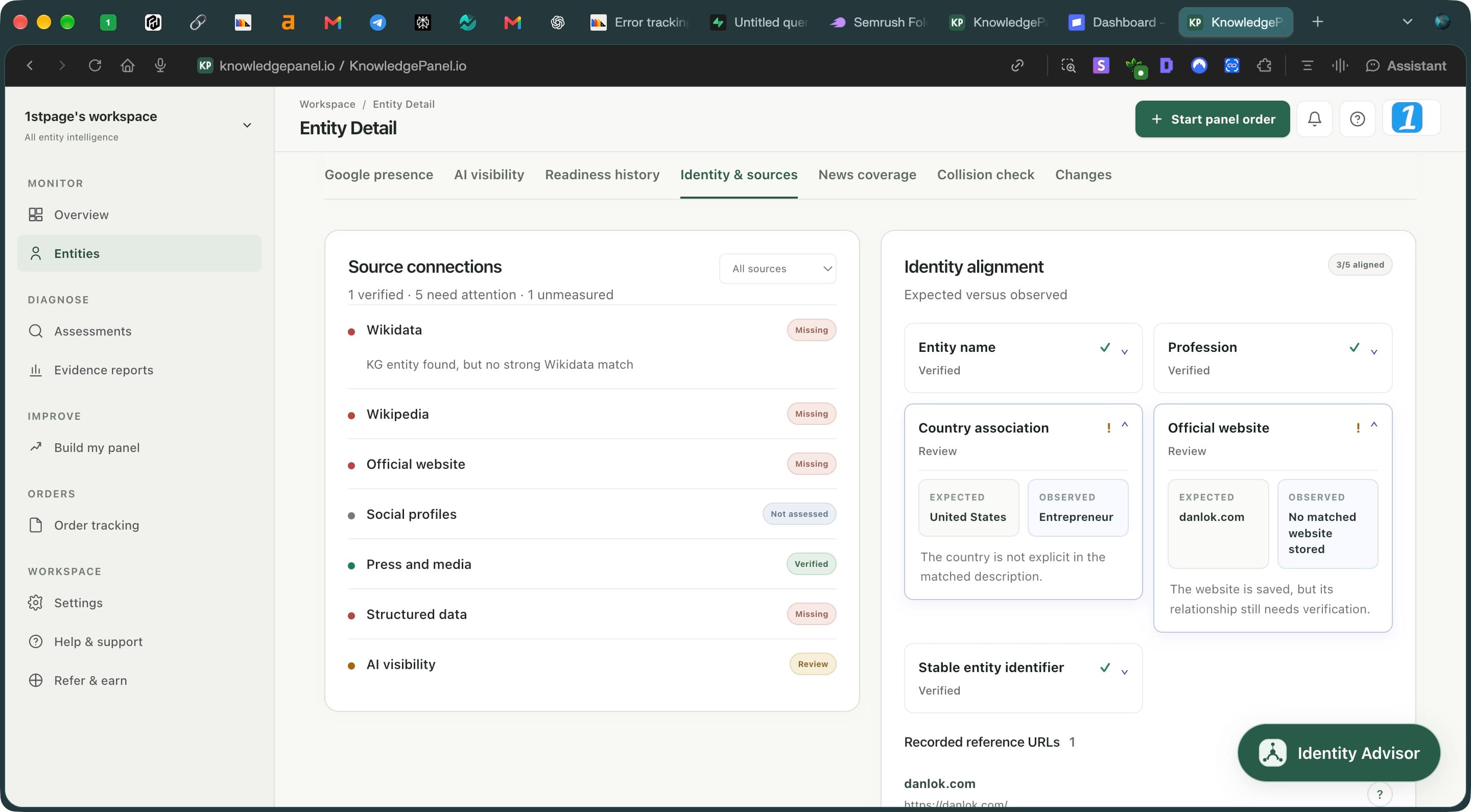
- Read the channel status. Not assessed means unmeasured, not absent.
- Expand a review item to compare expected details with observed evidence.
- Read the explanation before changing a fact or website connection.
4. Connect the evidence with accurate structured data
Once the visible information is correct, ask your developer to review the structured data on your website. Use a suitable entity type and stable identifiers. The sameAs property can connect URLs that unambiguously identify the same entity. Do not use it to claim that a person is identical to their employer, a publication that mentions them or an unrelated namesake.
Google’s ProfilePage documentation describes markup for pages focused on a single person or organisation. Follow the requirements appropriate to the page, and make the markup reflect what visitors can read. Test the implementation and check that the relevant page is accessible to search engines. Structured data can clarify information, but it does not guarantee a Knowledge Panel or another search feature.
Schema.org: sameAs · Google: ProfilePage structured data · Google: structured data policies
5. Read the AI visibility evidence behind the score
Open AI visibility to investigate whether a measured answer recognises the right entity. In the captured example, the baseline is 68/100, with an 80% mention rate, 50% identity accuracy and 60% official-site cited. The sample contains five returned answers and fourteen cited domains. These figures describe those observations, rather than every answer an AI service might generate.
The current official-site measure can detect the domain in answer text or among returned sources. Inspect the actual links to distinguish a domain mention from a clickable citation. Likewise, the accuracy percentage is based on recognised answers with a measured accuracy judgement; it does not necessarily share the mention-rate denominator.
Expand the question rows to inspect the returned answers and citations. Ask whether the answer recognises the correct entity, describes the right role and connects the right website and organisations. A citation is a route to inspect a source; its presence alone does not establish that every statement is accurate or that the publisher is independent.
When another website is cited, inspect what information it provides before deciding the result is a failure. A publisher’s biography may support an author relationship, while the official website may explain current services. Look for wrong identities, unsupported facts and broken relationships. A trustworthy external citation can be useful even when it is not your own domain.
The first successful check establishes a baseline. It cannot demonstrate improvement by itself. Compare later reports using their dates, provider information and underlying questions, and acknowledge changes in the measurement setup. Use Identity Advisor to ask which captured evidence supports a recommendation. If the report cannot answer a question, seek additional evidence or contact support instead of filling the gap with speculation.
Understand AI mentions and website citations
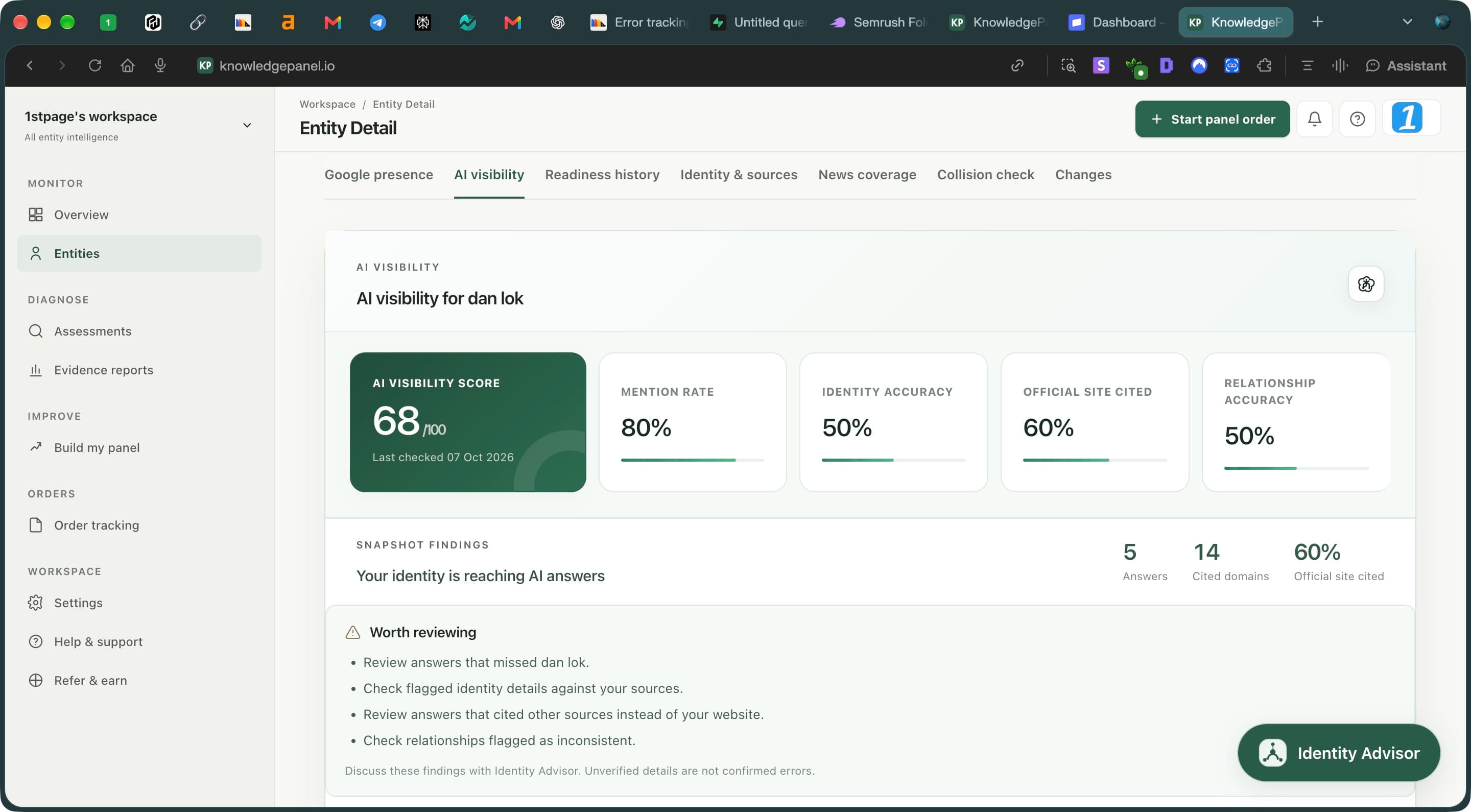
- Check the date. This is one measured baseline, not a universal AI score.
- Compare mentions, identity accuracy and website citations separately.
- Check sample size before drawing conclusions: five answers, fourteen domains.
6. Track progress after fixing the underlying sources
Create a focused action list: repair the official website connection, align priority biographies, remove misleading links and document legitimate relationships. Assign an owner to each correction and save the supporting URL. Fix the public source first. Repeatedly checking an unchanged page is unlikely to provide useful evidence of progress and can consume your available checks.
After changes are published, allow time for discovery and run a new assessment when appropriate to your access and allowance. Open Readiness history, select a point and compare the saved observations. In our example, three observations on 5 October show the same score of 29. The flat chart records no measured readiness change across those observations; it does not establish a failed campaign.
Review source-level changes as well as the headline score. A verified website connection can be a useful operational improvement even before a search feature appears. Keep traffic and commercial outcomes separate: use Search Console for Google search performance, platform analytics for social engagement and your own conversion records for enquiries. A dashboard readiness score is not search impressions.
A sensible monthly review checks whether important facts changed, whether key links still work and whether new evidence warrants another assessment. Schedule around genuine changes such as a new website, role, publication or service delivery. Keep the previous baseline so you can explain both improvements and unresolved uncertainty.
Google: getting started with Search Console
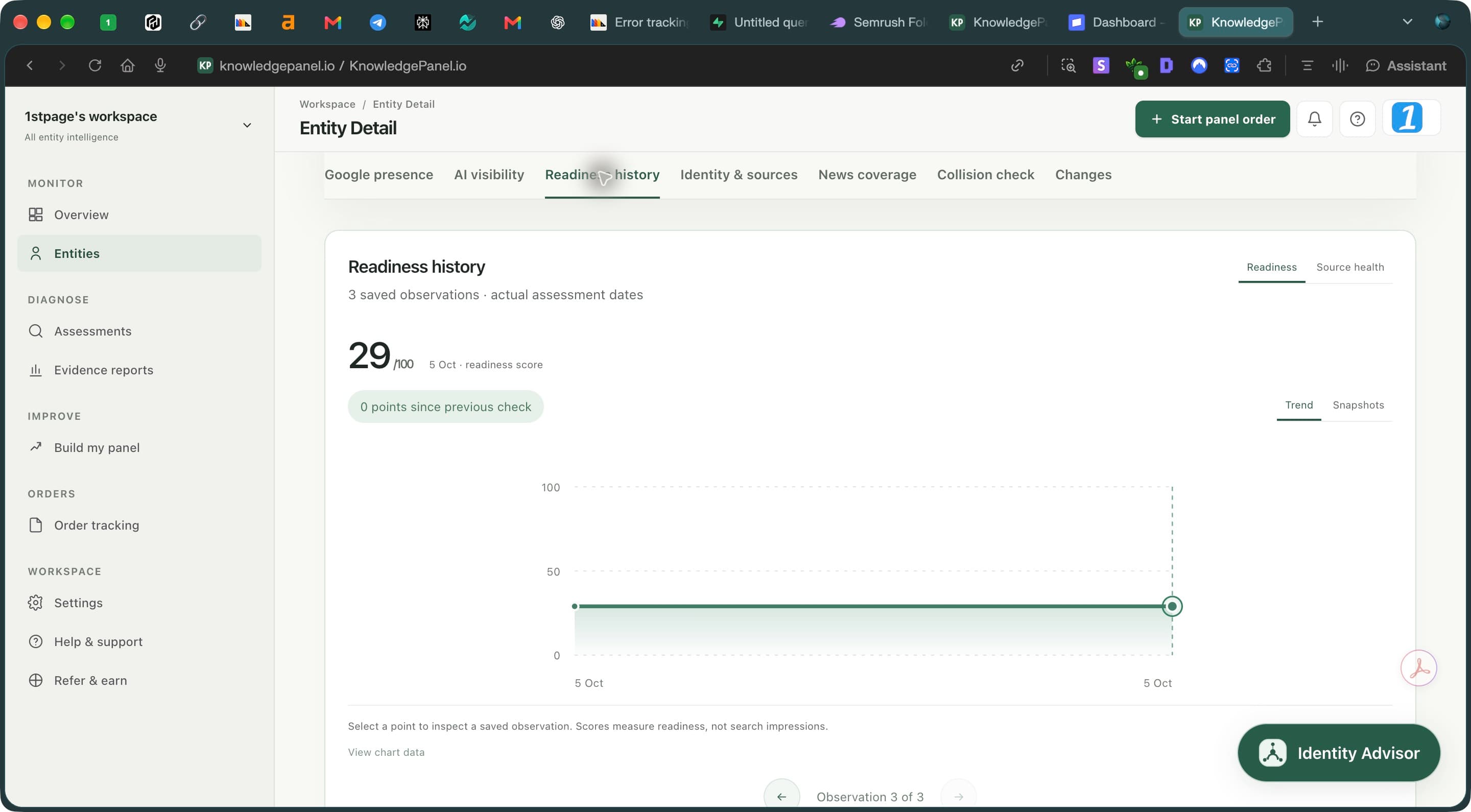
- Read the number of saved observations and their actual assessment dates.
- Select a chart point to inspect that observation; a flat line means no measured change.
- Switch between readiness and source health to investigate the underlying signals.
Your first 30 days: a practical identity gap checklist
During the first week, establish what is true. Choose the entity you are auditing, collect its genuine URLs and write a concise reference biography. Document current roles, relevant aliases and the relationships you can support. Open the dashboard and note the assessment dates. Mark each flagged item as a confirmed mismatch, missing corroboration or an unmeasured channel. This prevents your team from treating every warning as the same problem.
In the second week, correct the sources you control. Update the official biography, website links and priority social profiles. Keep a change log with the previous wording, the correction, the supporting evidence and publication date. Test links while signed out where possible, because a profile visible to its owner may expose less information publicly. Remove links to accounts that do not belong to the entity.
Use the third week to review technical connections and external references. Ask your developer to check the relevant structured data, and request factual corrections from publishers or organisations where necessary. A correction request should identify the specific error and provide a reliable reference. Do not ask a publisher to manufacture praise or imply affiliations that do not exist. Relevance and accurate identification matter more than accumulating a long list of URLs.
In the fourth week, review what changed and what remains uncertain. Run an appropriate follow-up check, inspect the underlying evidence and compare it with your baseline. If a connection is still unverified, check the reason before repeating the assessment. Your final summary should state which sources were corrected, which facts are now supported and which questions remain unresolved. That is a useful progress report even when the overall score stays unchanged.
Frequently asked questions
Which identity gap should I fix first?
Prioritise a wrong destination or material factual error before small wording differences. Verify the correct information, fix the strongest source you control and document external corrections. A website linking to the wrong account deserves attention before a harmless difference between two accurate biographies.
Do all my biographies need to use exactly the same wording?
No. A short social bio and a detailed professional biography can describe different aspects of the same identity. They should agree on substantive facts and explain legitimate aliases or role changes. Avoid forcing identical wording where it would remove useful context.
Does Not assessed mean my social presence is missing?
No. It indicates that the saved assessment did not measure that channel. Inspect your genuine profiles manually and distinguish an unmeasured channel from an attempted check that could not verify a connection. Neither label should be turned into an unsupported claim about your entire online presence.
How long does closing an identity gap take?
You can correct an owned page quickly, but external edits, discovery and search updates follow different timelines. There is no fixed Knowledge Panel timetable. Track completed corrections and dated observations, then judge progress against the evidence rather than a promised number of days.
Find the evidence behind your next correction
Review your entity’s public signals, inspect what needs attention and keep a baseline for your next assessment.
Review your entity →
3. Run a social presence audit that improves identity clarity
Build an inventory of genuine profiles before opening more accounts. Include the official website, LinkedIn and the networks relevant to your work. Artists might include music platforms; authors might include publisher biographies. For each URL, check the displayed name, biography, current role, website destination and any explanation of aliases. Confirm that the page represents the intended entity.
Make your official website the clearest starting point. Publish an accurate biography and link to your genuine public profiles. Where a platform allows it, link the profile back to that official website. Describe personal accounts, company pages and projects accurately: a founder and their company are related entities, but they are not interchangeable identities.
Prioritise meaningful discrepancies. An outdated employer, an incorrect domain or a profile belonging to someone else deserves attention before minor stylistic differences. Keep claims proportionate to evidence. If you cannot substantiate a location, credential or affiliation, investigate it rather than adding it everywhere for consistency. Repeating an unsupported claim does not turn it into reliable evidence.
Avoid treating follower counts as a substitute for identity verification. During this audit, success means that the right profiles are connected and their descriptions are accurate. Measure engagement separately with each platform’s analytics. That separation lets you distinguish an audience growth problem from a problem identifying who the audience is actually looking at.
A creator-specific identity checklist